Posts

Showing posts with the label Open Source

Discuss the result in Release 0.4

Image
 After preparing for the fourth assignment, I start to code and test my project. I add a command ling flag "-d" to indicate that I will process a directory to test all the files for checking links. In addition, I create a new .js file to encapsulate all the coding about reading a directory.  After completing the code, I start to test my project. But unfortunately it outputs some errors.                                                                        Error message After research and analysis, I realize that there is a problem with the directory path. It can't find the real file in my local host. Then I fix the bug.                                                   ...
Update the process about Release 0.4

 In the second blog of Release 0.4, I will update my process about my link check project . Until now, my link check project can test status of a single link and the status of all the links of a file. But it can't process a directory to check all the files which include the links. So, I decide to add this feature to my project. I create an issue in the repo of Github. During the studying of Javascript and C++ programming languages, I just know how to read a file. It is a new topic for me. So, I need to search for the resolution for reading a directory. After searching, I find that there are two ways to read a directory using JavaScript. One is "fs.readdir()". The other is "fs.readdirSync()".  The  fs.readdir() method  is used to asynchronously read the contents of a given directory. The callback of this method returns an array of all the file names in the directory. The options argument can be used to change the format in which the files are returned from the me...

Choose a project in Release 0.4

 Release 0.4 is my fourth assignment for OSD600 course. There are three steps to complete it. The first step is to choose a project which you will work with. The second step is to update the process about the work. The last step is to show my result for the project. Because it is close to my test week. I don't have enough time to search for a new suitable project. So, I decide to work with the former project in this course. Actually I plan to work with my link checker project . I had designed some features which can be used to test if a link work well. But I think there are still something which I can promote. This is true for every IT project, and you can continually improve the project to make it better and better. In the first assignment for this course, my professor list many optional features which can be designed into the link check project. I will choose one of them which I don't complete to further refine my project.

Publish project in Lab 9

Image
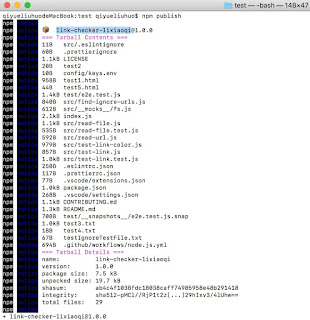
This week we start to practice how to release your project into public. In this way, the users don't need to clone  and build your project to run it locally. They can install it globally and use it easily. In this lab, I utilize my link checker project to practice to release it. Because my project was written by Node.js, so I choose npm platform to create my release.  First of all, I read the npm documents and check my project files step by step. I make sure the package.json file includes everything required such as name, version, dependencies, scripts, author and so on. After modifying all the things, I push these changes into my GitHub. Second, I create an account in npm website . It  is a necessary step if you want to publish your project into npm platform. Then,  I us e the command "npm login" to login the npm platform. After that, I use the command "npm push" to release my project. In the first release operation, there is a 403 error which shows " Yo...

The software testing in Lab 8

Image
 This week we start to practice how to test the project with a testing framework. In the lab, I choose Jest to test my link checker project  written by JavaScript.  Jest  is a testing framework developed by Facebook. Originally designed to make UI testing easier for React developers, it’s now a full standalone suite of tools for any type of JavaScript project (including Node.js) and includes features such as a built-in assertion library, code coverage, and mocking. Jest also runs multiple test suites concurrently, which can speed up the overall testing process.  Jest has a lot of advantages, so I want to use it. First of all, I install the Jest to my local project using the command " npm install --save-dev jest ". Then I write three unit tests for reading a file and requesting a url by creating two new .test.js files. After completing the coding, I try to test them using the command "npm run test" and it works well. Unit test Second, I add some scripts in the p...

The second pull request for Release0.3

Image
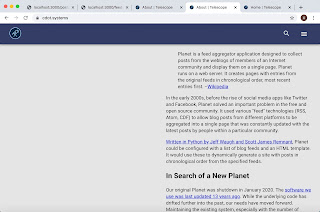
Telescope is an open source web server and client application for aggregating and presenting a timeline of Seneca's open source blogs.  This week I try to fix an issue in the  Telescope project .  First of all, I setup the Telescope project in my local host. When I look at the "About page", I find that half of that page will be blank if I scroll down the page. It looks  weird. So, I create an issue about the problem.                                                            About page before In order to fix this issue, I create a new <div> tag to wrap the pictures. Then, I set CSS for this tag to make the <div> tag sticky to the top of the page.                                               ...

The first pull request for Release0.3

Image
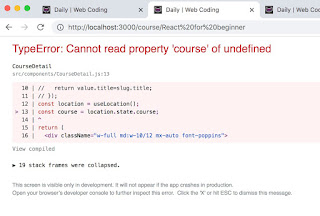
 For the first pull request of Release0.3, I choose a new project named  react-course-theme  to deal with.  In the project, there is a crash issue when the user input a url to enter the website directly. But it will be fine if the user enter the website through the link of the main page. Error message When I analyze the project, I find the problem comes from using  useLocation ( ) function of " react-router-dom ". W hen  every route is connected, the value can be passed from one page to the next clicked page. But when you want to enter the website directly through URL, the new page can't get the value from the  useLocation ( ) function.                                      Use  useLocation ( ) function to get value from previous page Pass value through history.push() function In order to fix the issue, I choose to parse the URL to get unique ID u s...

Use Static analysis tools in Lab7

Image
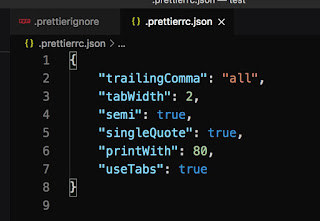
 This week we learn to manage our projects using Static analysis tools.  Static analysis tools help us maintain the quality of our source code by fixing formatting issues, spotting suspicious coding constructs, or alerting us to common errors. Now I use my  testLink  project to practice these tools. Create a CONTRIBUTING.md File First, I create a  CONTRIBUTING.md file to  separate the setup and development content from README.md file. Add a Source Code Formatter I pick Prettier formatter for my JavaScript project. Following the instruction, I use the command " npm install --save-dev --save-exact prettier " to install the tool. After installing, I use the command " npx prettier --write . " to formate all my files and " npx prettier --check . " to check the files if there are some wrong formation. I also set the ".prettierrc.json" and ".prettierrcignore" file. Then, I create  a simple "one-step" solution for running my formatte...

Prepare for Telescope project in Lab6

Image
 This month we will start to work on Telescope project.  Telescope is a somewhat complex system that uses many technologies.  For the first week of this month, we need to prepare something for the project. First of all, I try to set up the  Telescope development environment on my local host.  I have to say, it took me a lot of time to  set up this environment . After searching for and installing relevant applications, I implement the Telescope project successfully. http://localhost:3000/posts http://localhost:3000/feeds Second, I add a new feature in my  Link Checker project  to  check the links in the last 10 posts indexed by my local Telescope. I create a new js file called readUrl to  implement  the function. After modifying the code, I test it successfully.                                                 ...

The fourth pull request for Release0.2

Image
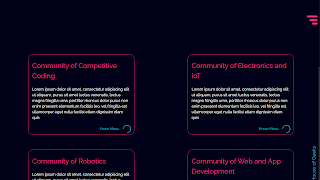
This time I find a project which has twenty contributors using advanced search with label "good first issue" in GitHub. The project is written with React and is a website of  House of Geeks .  There is an issue about missing the title in the Communities page when customers  visit the community component via navbar. After understanding the issue, I fork the repo and download the file into my local host. Then I create a branch for the issue. No title page When I look at the code, I find the problem in the Community component. The author indeed writes the title for this page. But he puts the code in the wrong place and has the wrong CSS code. I  quickly fix them and test the website in my local host. It works well. Communities page with title At last, I push these changes to my GitHub and pull my request to the author.  This month is a wonderful month for me. I learn what is the open source project and how to contribute to them. I can't imagine it befor...

Practice git rebase in Lab5

Image
 This week we start to how to use git rebase in open source project. Git rebase is used to rewrite git history and make your project  a bit of a clean-up.   In the lab5, I will try to promote my test link project to be more concise. Fist of all, I split my index.js file into two separated files, index.js file and read-file.js file. The read-file.js file will include all of the logic to read a file. After completing the changes, I try to execute the project and it works well. Second, I modify the code about showing the version of the project to make it more readable. After modifying the code, I test the code well and make a commit. Third, I change the code about showing the help information. Then, I test the code and make a commit. After completing above steps, I use git rebase master -i command to  squash everything into a single commit. Then, the three commits are combined into one commit. I also use git commit --amend command to change the combined commi...

The third pull request for Release0.2

Image
 This time I try to search for an issue which is about a new topic for me.  After looking around from GitHub, I find an interesting issue from  screen-recorder  repo. The project can be implemented to show the window, but there is an error message " Uncaught TypeError: Cannot destructure property 'dialog' of 'remote' as it is undefined.   ". In order to analyze the error, I fork the repo and download all of the files. I find the variable dialog comes from the variable remote and the remote comes from the electron dependency. Next, I try to figure out what "electron" is.  Electron is an open-source software framework developed and maintained by GitHub. It allows for the development of desktop GUI applications using web technologies: it combines the Chromium rendering engine and the Node.js runtime. When studying the document of Electron, I see an example of dialog. Dialog example Comparing the usage of dialog from the author, I think the error was...

The second pull request for Release0.2

Image
 Now, it is the second week for my Release0.2 assignment of OSD600 course. I plan to practice a new pull request using git and GitHub.  First of all, I try to search for a suitable issue from open source projects. In this time, I search for the issues with the limitations of "good first issue" and "JavaScript" through advanced search in GitHub. Then I find an issue about combining the data to a separated file fro m a  repo . Now all of the needed data is in the main index.js file. But the main file will be clunky when the data is too much. So I decide to store all of the test data to a separated js file. I create a new branch named issue-24 for the flowing changes. After storing the data to a single file, I exports these variables. Then, the main index.js file can use them. When I complete all of the changes, I try to test if it works well. Test At last, I commit the changes and push them to my forked repo. Then I pull a request to the author to check.

Practice git remote and git merge in lab4

Image
 This week I am practicing using git remote and git merge through adding a new feature to the project another classmate completed. The steps are as following. creating branches to work on new features and fix bugs working on code changes in another project you didn't write using  git remote  and sharing commits with  git push ,  git pull , and  git fetch using  git merge  and doing practice merges fixing merge conflicts First of all, I choose a repo in Realease0.1 submissions list . The repo was created by my classmate,  Alexander Hugh. I filed an issue and forked the repo.  Second, I clone the repo to my local host and create a branch named issue-17 to add a new feature. The new feature is about adding the ignore URL patterns to  to exclude URLs from our check based on a URL pattern file. I push the new changes to the fork repo when I fix the new feature.                    ...

Hacktoberfest pull request 1

Image
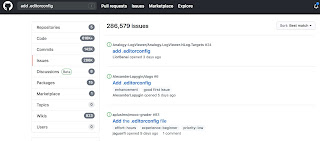
I will try to practice how to use pull request to fix issues within open source programs in release0.2 of OSD600 course. This month I am planning to pull 4 requests step by step from easy to difficult. I hope to improve my ability to fix issues of open source programs through this practice.  First of all, I try to search for some issues in GitHub. I select a simple issue for my first pull request. When I search for "add .editorconfig", There are a lot of issues about it. I can clarify them by programming languages.                                                                           Search for issues Obviously, I need to understand what is editorconfig when I c hoose this subject.  EditorConfig helps maintain consistent coding styles for multiple developer...

Study git merge in lab3

Image
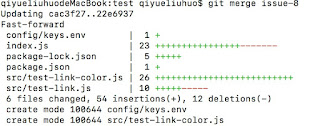
  In this week we are studying to manage multiple simultaneous changes. After modifying these files, we will use git merge to combine the changes. It is wonderful for us to collaborate with other people to contribute to the same open source project   using git merge.   I start to practice how to use git merge in my lab3 work. I need to add two new features to my link checker repos named testLink .    First of all, I create an issue #8 in my testLink repos of GitHub. Then, I create a new branch named issue-8 to add the environment variable feature which is used to make sure the program honors the CLICOLOR environment variable using “git checkout -b issue-8” command. I implement this feature in the issue-8 branch.   Second, I create an issue #9 in my testLink repos of GitHub. Then, I create a new branch named issue-9 to add the json flag which is used to causes the program to output JSON using “git checkout -b issue-8” command. I implement this feature in t...

Pull requests

This week we are discussing Hacktoberfest which means everyone who is interested in programming can help drive growth of open source and make positive contributions to an ever-growing community. In this way we do not only share our code GitHub, we also contribute to any GitHub-hosted repositories through pulling requests. There are some important steps. forking and cloning a project in GitHub creating branches to work on new features and fix bugs working on the code you, trying to maintain the original style and not break things creating pull requests collaborating with other developers on GitHub updating your pull requests to include fixes for review comments Following above steps, I work on Zongjin Jiang’s project-checkurl tool which is a command-line tool and can test the status of a URL. When I look at and test the file, I find that the printed version feature is static. First of all, I build a branch for my work after cloning the code. Then I create an issue and a pull request o...

Promote myself

Image
 This week we have an interesting work in our OSD600 course. I need to test my classmate's command-line tool and provide some advices. In the meantime, other classmate will test my code and help me to fix some issues. This is a small step which tell us how to collaborate within the open source world. I have to say that I have a great testing experience for my classmate's code. First of all, I find his work through GitHub where we submit our assignment Release 0.1. After executing the first install command, I start to test. I test all the functions which are mandatory and some optional functions. All the functions work well and have the suitable output. When I look at all the files carefully, I find some small issues  there. And most importantly, I lean a lot of things from his code. For example, how to use the attributes of " require ( 'optimist' ) . argv" and " readFile() " . Below is the screen shot. My classmate also helps me to find out my issue...